
A text arrives while you are waiting for a package. It uses your first name, mentions a delivery problem and asks you to confirm something before the parcel moves again. That combination can feel more convincing than a random message about an order you never placed.
You still have a useful option: leave the text and check the purchase somewhere you already trust. The question is whether your actual order needs attention, not whether the message sounds personal enough to deserve a tap.
Imagine a holiday gift arriving later this week. A text addressed to you says the package cannot be delivered until you correct the address. This is a hypothetical example, not a report about a particular carrier or a claim that your order information was stolen. It is a reason to check the order through an independent route before sharing more information.
Key Takeaways
- A name, delivery reference or plausible arrival date does not establish who sent the text or authorize its requested action.
- Start with a retailer account, order record or carrier route you already know. Confirm which shipment is involved before changing anything.
- Carrier practices differ. USPS guidance about requested tracking texts should not become a blanket rule that every carrier message or delivery-related fee is fake.
- Look at the request: payment information, a password, a security code, an app installation or a changed delivery address each deserves its own check.
- If you interacted already, describe what you actually did and secure the relevant account, payment method or device. Do not wait to prove how the message was written.
A name in a package text is context, not permission
Separate two questions that can get bundled together: does this detail sound familiar, and is this a trustworthy way to handle the delivery? A text can answer the first question without answering the second. Your name may make you read more closely. It does not establish control of the retailer account, responsibility for the parcel or authority to collect a payment.
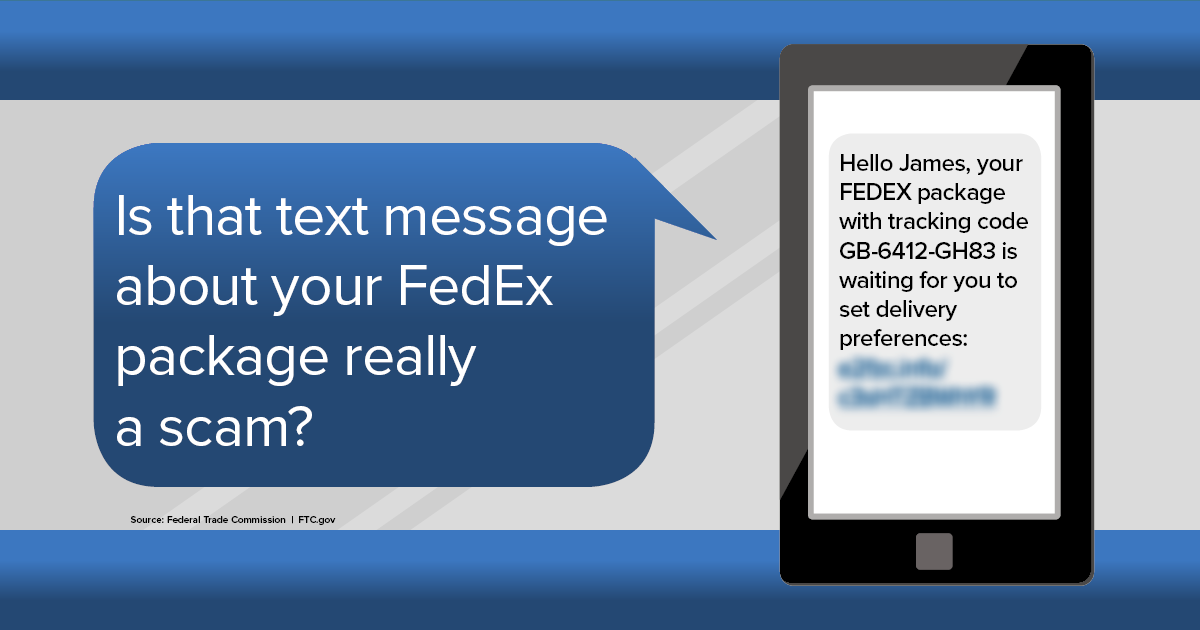
The FTC’s explanation of a shipment-tracking text scam describes a fake tracking code and a link presented as a way to update delivery preferences. Its illustration greets someone named James and includes a shipment code; it is an educational example, not evidence about your own text. The FTC advises contacting the company using information you know is genuine, rather than information supplied in the message. The lesson remains useful when a delivery story feels familiar.
Do not turn a personalized detail into a diagnosis of where your information came from. The text alone does not establish that a retailer was breached, that a carrier employee shared your order or that an attacker is following your movements. Those are separate factual claims requiring evidence. You can refuse an unverified request without choosing a theory about how its sender found you.
The same restraint applies to AI. This article does not identify a message as AI-generated from its grammar or polish. A hurried, badly written request can be dangerous; a fluent one still needs verification. Our guide to spotting AI text scams explains the broader habit of examining what a message wants you to do. Here, give that habit one concrete job: connect the delivery claim to the order you actually placed.
There is no need to investigate every line of the text before doing that. Ask whether you can resolve the delivery question without using the supplied link, phone number or reply route. If you can, the message’s personal touches do not need to decide your next move.
Match the package to an order you already know
Start with your own record of the purchase. Open the retailer’s app you normally use, a saved site you recognize, or another independently known way into your account. Do not use the text’s link as a shortcut to the same destination. The point is to choose the route yourself.
Find the order, then identify its shipment details. Which carrier is named there? Is the parcel still being prepared, in transit, delivered or awaiting an action? If the retailer split one purchase into several shipments, work out which parcel the message could concern before treating a general reference as a match.
Use the tracking reference in the order record to reach the carrier’s tracking service through a known official route. Compare what that service says with the text’s claim. If you need to change a preference, resolve an address problem or ask about a fee, continue inside that verified process or contact support through independently obtained details.

Consider another hypothetical example. Your order account identifies one carrier and says the gift has not yet shipped. A text names another carrier and threatens to return the package tonight. You do not have to decide whether the sender deliberately targeted this purchase. The information does not give you a sound reason to act through the text. Ask the retailer about the order if you still need clarification.
A close match also needs care. Suppose the timing and tracking reference appear consistent. That can help identify the shipment you should ask about. It does not, by itself, verify the route supplied in the message or the person asking for your payment details. Keep the order match and the communication channel as separate checks.
Sometimes the order belongs to someone else. A household member may have bought a gift, used a shared delivery address or arranged something for you. Ask that person through an ordinary conversation or a contact method you already use. Have them check their own order account. Forwarding the questionable link and asking them to try it moves the same uncertainty to another person.
If you cannot find a matching purchase, stop at that uncertainty. You may need a household conversation or help from the retailer. You do not need to supply your full address, birth date or payment card to the text sender just to discover what the supposed package is.
USPS, FedEx and UPS need different checks
It is tempting to use one memorable rule for every delivery message. The more useful approach is to identify the actual carrier and check its own guidance. A rule about one tracking service is not a promise about all parcel communications.
The U.S. Postal Inspection Service’s package-tracking smishing warning says USPS tracking texts require a customer request for a specific tracking number and do not contain a link. If an unexpected USPS message supplies a link, leave it and check the shipment independently. USPIS also advises notifying your financial institution if you interacted with the suspicious URL, even without pressing Submit.
For a package actually carried by USPS, ask whether you requested that tracking service and whether the message fits its stated practice. Do not assume that an official-looking name changes the answer. If you remain unsure, use the tracking and contact routes you reach independently.
FedEx’s current fraud guidance includes an important qualification: for an international package, FedEx may send email or SMS with a secure link to pay applicable duties and taxes. It says those messages and amounts can be verified through its Import Tool. That is a reason to independently check the actual shipment and amount, not a reason to trust every payment link carrying the company’s name.
The UPS fraud guidance similarly identifies collect-on-delivery charges, duties and taxes as situations where money may be due, and directs customers to track the package to check fees. Use the official tracking or billing route you reached yourself. A legitimate category of charge does not authenticate a particular request.
For an unfamiliar carrier, resist borrowing a rule from a different company. Begin with the seller’s shipment record, then obtain the actual carrier’s contact details independently. If you cannot establish which business is handling the parcel, that is a delivery question for the seller before it becomes a payment decision for you.
You can keep this check modest. You are not certifying the entire delivery system. You are establishing enough about one parcel, one requested action and one trusted route to make the next decision responsibly.
Watch what the text asks you to hand over
Treat the requested action as its own decision. A notice that a package is delayed is different from a request to type a card number. A parcel identifier is different from a password. Reading a status update is different from installing software or giving someone a code that protects an account.
Ask four questions: What exactly am I being asked to provide? Which organization needs it? Can I see the same requirement in the independently reached order or carrier process? What changes if I comply? If you cannot answer those questions, leave the request unresolved while you contact the business through a known route.
For payment, compare the amount and reason with the actual shipment. Is this a verified duty or tax for the international parcel you located, or a small unexplained charge on a page reached only through the text? Do not let a low amount settle the issue. The decision includes whether you are giving an unknown page access to payment details, not simply whether you can afford the displayed fee.

For a login, decide which account you are trying to access before typing a password. If your purpose is to check the seller’s order, open that account directly. If the link takes you to an unexpected brand or an unrelated offer, stop rather than following the story into another transaction. Return to the original delivery question.
For a one-time code or account approval, read what the notice says the code or action is for. Do not relay it to a person in the text conversation. Apple’s advice on phishing and social engineering recommends contacting a company directly about suspicious requests and keeping passwords and verification codes private. A claim that a code will release the package does not establish that purpose.
For software, stop before downloading an app, approving a profile or granting access just because the message presents it as a delivery requirement. Verify the need through the actual business first. You do not need to complete an unfamiliar technical step to demonstrate that you are cooperating with a supposed courier.
The deadline in the message does not remove these choices. If the order genuinely needs attention, an independently reached service is where you can ask what the deadline means and what options exist. The text sender does not get to define the only acceptable route.
What to do with the text right now
First, leave its links and reply instructions alone. Keep the original delivery question in mind while you check your own order. If you need support, use contact details obtained through the retailer or carrier route you chose independently. Explain the specific mismatch or request instead of asking support to guess what an unexplained screenshot means.
Second, record only the useful context. A screenshot can preserve the sender, time and wording without requiring you to open the destination. If you contact a business, describe whether the text used your name, included a reference or asked for a change. Keep sensitive order and payment details out of public posts asking strangers to investigate.
Third, decide what is resolved. Perhaps the real order has no problem. Perhaps an independently reached carrier confirms a fee or address issue. Perhaps the seller needs to investigate. Each outcome gives you a next step without requiring a reply to the original text.
Finally, use established reporting controls for the unwanted message. The FTC’s spam-text guidance describes reporting through the messaging app, forwarding unwanted texts to 7726 and reporting to the FTC. Preserve any records you need for an active account or payment problem before deleting the message. Reporting does not replace securing an exposed account or contacting a payment provider.
Keep the stopping rule simple: when you have checked the real order and handled any genuine requirement through a known route, you do not need to keep engaging with the text to prove that it was false. Your task was to manage the purchase safely.
If you already followed the link
Start by describing the interaction accurately. Did you only open a page? Did you type an address, a password or a card number? Did you approve a code request, download something or install it? More than one category can apply. Work on the actions that actually occurred rather than using one reassuring or frightening label for the whole incident.
You opened a page and did nothing else
Close it and stop following its instructions. Note anything you remember about downloads, permission prompts or information you entered. Do not reopen the destination to see whether it looks dangerous. A visit alone does not tell you everything about the device’s state, but it is also not a complete account of an account theft or payment loss.
The FTC’s phishing response guidance distinguishes exposed information from suspected harmful downloads and advises updated security software and a scan when harmful software may have downloaded. Follow the relevant response for your device and interaction. Do not treat a scan, an absence of visible problems or a closed browser tab as proof that every account is safe.
You entered credentials, payment details or personal information
Tell the relevant provider exactly what you shared, including details you typed even if you do not recall completing the form. Use a known account, app or phone number, not a replacement contact offered by the same message. Keep the sequence clear: the delivery text, the page you opened and the information or payment involved.
The FTC’s recovery advice for people who were scammed says to contact the payment provider promptly about a fraudulent payment, and to change an exposed password and any reused copies. Ask the provider what it can do; do not assume a refund is automatic. Its identity-recovery directions also depend on the information exposed and whether it was misused.

If a verification code or approval was involved, identify the account named in that notice and contact its actual provider. Explain that you supplied or approved something after a delivery pretext. Avoid calling it merely an address correction if the notice actually concerned an account login or payment. That distinction helps you ask for the right assistance.
You installed an app or a configuration profile
Pause sensitive activity on the affected device while you obtain trusted help. Keep a note of what was installed, which permissions you approved and which accounts you used afterward. Do not install another tool recommended by an unsolicited person who offers to fix the package problem or recover your money.
On Android devices with the relevant Google services, Google’s Play Protect instructions explain its app checks, warnings and removal options. Use the documented controls and follow up if you cannot identify or remove the suspected installation. A clean result is not a guarantee about information already shared elsewhere.
For iPhone, Apple’s configuration-profile guidance identifies the installed-profile controls under Settings, General, VPN & Device Management. Apple warns that deleting a profile also deletes associated settings, apps and data. If the device belongs to work or school, or you cannot distinguish an expected profile from the suspicious installation, involve its administrator or trusted support before removing management settings.
Use our clicked-a-scam-link response guide for the broader sequence when several accounts or exposures are involved. The goal here is to give that response an accurate starting point, not to prescribe a factory reset for everyone who saw a delivery page.
Make gift deliveries easier to verify
Set up the ordinary order record before the next confusing message arrives. For purchases you handle, keep the retailer confirmation and know where to reopen the order. When a carrier offers tracking notifications you want, arrange them through the carrier’s genuine service instead of enrolling through an unexpected text.
For shared households, agree who checks a delivery problem and who contacts the seller. A short message to a family member can say that you received an unverified delivery request and ask them to check their own purchase. It does not need to include the questionable link or pressure them to act immediately.

For a gift, balance verification with the surprise. You might ask whether someone arranged a shipment to your address without asking them to reveal the item. If they did, have the buyer handle any seller or carrier questions from the order they placed. A surprise is not a reason for the recipient to provide payment details to an unfamiliar message.
Keep the method useful for people who are less comfortable with apps, too. The essential step is an independently known route, not a demand that every recipient create several new accounts. A buyer can help check the order; a carrier can be contacted through details obtained from its actual site. Choose a manageable path you can explain to the person using it.
Our Cybersecurity Basics hub connects this delivery habit to other everyday account and device decisions. The transferable question is whether you chose the route and understand the action, even when the original message seems plausible.
Conclusion
A package-tracking text can contain a detail you recognize and still leave the important questions unanswered. Which purchase is involved? What does the actual carrier say? What information or action is being requested, and can you handle it through a route you already know?
Check the order first, apply the actual carrier’s guidance and respond to the exposure that occurred if you already interacted. You do not need to prove the sender’s identity, diagnose AI authorship or discover a data breach before declining to use an unverified link.
For more calm, practical help with everyday digital decisions, subscribe to Quantum Cyber AI.
FAQ
Is a package text genuine if it knows my name?
The name does not settle that question. Match the package to an order through a retailer or carrier route you independently know, then verify the requested action there. Do not assume the message proves a particular source of exposed information.
Should I ignore every delivery message containing a payment link?
Leave an uncertain link alone, but do not turn that caution into a universal claim that delivery fees never exist. FedEx identifies international duties and taxes as a possible email or SMS payment situation, and UPS identifies specific delivery-related charges. Check your actual shipment and amount independently.
What if the text includes a real tracking number?
Use your known order record and the official carrier route to check the shipment. A useful tracking reference does not establish that the message’s own link, sender or payment request is trustworthy.
What if I clicked but cannot remember what I entered?
Write down what you do remember, stop interacting and contact the relevant account or payment provider through a known route if information may have been exposed. Tell them about uncertainty rather than guessing that no final button means nothing was shared.
Do I need to prove the text was a scam before contacting the seller?
No. You can ask about your real order, its carrier and any action required without making an accusation about the text. Keep the delivery question separate from any report of suspected fraud or a request for help with exposed information.