
Your router sits quietly between your household devices and the internet. It is easy to remember the Wi-Fi password and forget the device that controls the connection. Router security becomes more urgent when an old model stops receiving updates, an unfamiliar setting appears, or a bargain replacement offers little information about support.
Price alone does not answer whether a router is safe. A modestly priced model with maintained software and sensible settings can be a better choice than an expensive device whose support has ended. The useful question is what you can establish about the particular model, its configuration, and its remaining supported life.
This guide explains seven router security risks, what a compromised router can actually see or change, and how to decide between updating, reconfiguring, and replacing it. A cheap router is not automatically a spy. A router that someone else controls is a problem worth addressing through evidence rather than guesswork.
Key Takeaways
- Judge router security by the exact model, support status, available updates, and settings—not its price or a flag on the box.
- The Wi-Fi password and administrative password protect different things. Secure both, along with any account used to manage the device.
- Disable internet-facing administration and unnecessary services using the manufacturer's instructions; check with your provider before changing managed equipment.
- HTTPS protects page contents in transit. Router control can still expose some metadata or enable interference, but it does not automatically reveal every encrypted password.
- A guest network helps only when its isolation settings fit the model and operating mode. It does not secure a compromised router.
- Slow speeds or flashing lights are not proof of compromise. Unexplained configuration changes and credible provider alerts deserve a closer look.
- Rebooting, resetting, updating firmware, and replacing hardware are different actions. Choose the response that fits the problem.
What router security protects—and what price cannot tell you
To understand router security, start with what the device does: it forwards traffic between networks and often provides Wi-Fi, firewall controls, local addressing, and device-management features. A provider's gateway may combine those jobs with a modem. Identify which equipment you actually control; an extra Wi-Fi access point or mesh unit is not necessarily the internet gateway.
NIST's consumer-router cybersecurity profile describes security outcomes for router products, including the broader software and services supporting them. That is a more useful basis for a buying decision than assuming that a low price proves poor engineering or that an expensive gaming label guarantees protection.
Router security has several boundaries. The device's administration controls who can change the network. Wi-Fi security controls who can join and protects the wireless link. Browser and application encryption protect different parts of a connection. None of these replaces the others.
You do not need to become a network analyst to make progress. Find the model and hardware revision, identify who supplies its software, and check whether that software is still supported. Our Home Router Security Checklist provides a shorter reference for the settings you choose to keep.
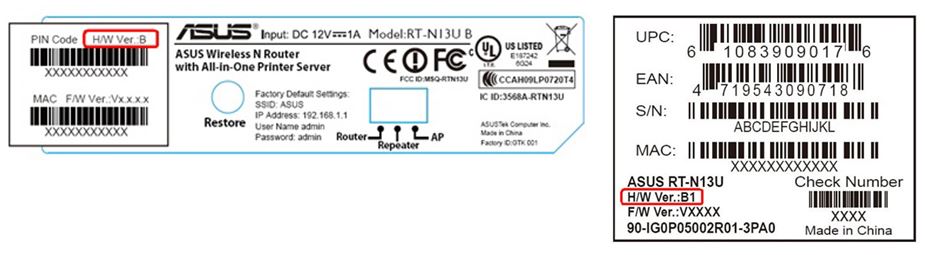
For router security checks, ASUS's model-specific support list illustrates why the hardware revision on a product label matters.
Risk 1: The router still works after security support ends
An internet connection can continue working long after the manufacturer stops fixing the software behind it. That distinction is central to router security: successful browsing tells you the device functions, not whether newly discovered weaknesses will receive a repair.
For router security, NETGEAR's End of Service policy draws a useful line: products at that stage no longer receive firmware updates, including security updates. Other manufacturers use their own terms and timelines. Check the exact model rather than treating a brand-wide reassurance or the date you bought it as proof of support.
An update released several years ago may be the newest available file because support ended, not because the device has remained free of flaws. Look for a support-status notice as well as a version number. If the answer is unclear, ask the vendor or provider whether security fixes are still supplied.
For a supported model, install the correct official firmware and enable automatic updates when available. For an unsupported one, plan replacement instead of repeatedly reinstalling its final release. A strong password cannot patch a software vulnerability.
There is no universal three-year or five-year replacement rule that settles router security. Supported life, the ability to use appropriate security settings, reliability, and a known unfixable vulnerability matter more than an arbitrary birthday. A barely used old-stock bargain can have less support remaining than its unopened packaging suggests.
Risk 2: Administrative access is protected by the wrong password
Administrative router security involves a different permission from joining Wi-Fi: the ability to change the router's settings. The FTC's home-network guidance distinguishes the network password from the administrative password and recommends changing insecure defaults. Protecting only the first leaves an important router security decision unfinished.
Use a strong, unique administrator password wherever the model lets you set one. Do not reuse a shopping or email password. If management depends on a vendor account, secure that account too, including multifactor authentication when offered. Store recovery details somewhere you can reach during an internet outage.
Not every factory credential is the same. A shared default known across many devices presents a different problem from a unique credential supplied with an individual unit. Follow the model's instructions rather than assuming that every label containing a password demonstrates identical risk.
Check who else has management access. A former household member, old installer account, or forgotten shared login may matter more than an unfamiliar device name in a client list. Remove access that is no longer needed through the legitimate management process.
Router security is also about limiting mistakes: use an ordinary trusted device for administration, end the management session when finished, and do not type the administrative password into a website reached through an unsolicited support message. A request to “secure your router” does not authenticate the person making it.
Risk 3: Unnecessary management or forwarding is exposed
Remote administration lets someone manage equipment across a network connection. That can be useful, but an internet-facing management service is a different exposure from changing settings while connected at home. Router security improves when access matches a real need rather than an old setup choice.
In its May 2025 warning about criminals exploiting end-of-life routers, the FBI described proxy malware affecting unsupported devices, including routers with remote administration enabled. It recommended disabling remote management and replacing unsupported equipment where possible. This was a specific warning, not a claim that every remotely managed gateway is infected.
Check settings for remote administration, port forwarding, and UPnP. Port forwarding deliberately makes a local service reachable through the router; UPnP can let software request mappings automatically. Remove unused rules or features, but first identify whether a needed game, camera, remote-access arrangement, or provider service depends on them.
A vendor's cloud-management app may use a different mechanism from the local remote-administration switch. Turning off one setting does not necessarily disable every account-based management route. Consult the actual model's documentation instead of assuming a switch has a broader effect than its description.
For ISP-managed equipment, ask the provider which settings you control and which services it requires. Router security does not improve when an unexplained change breaks the connection or prevents necessary maintenance. The goal is a documented small set of needed access paths, not a collection of enabled features you cannot explain.
Risk 4: The wireless network uses weak protection
Supported software is one part of router security; a patched router can still be configured with outdated Wi-Fi encryption or an easily guessed network password. This affects nearby wireless access; it is separate from whether the administrative interface is reachable from the internet.
Apple's recommended router settings favor WPA3 Personal, with WPA2/WPA3 Transitional or WPA2 Personal using AES for appropriate compatibility situations. They discourage obsolete options such as WEP, original WPA, and TKIP. Use the strongest suitable option your router and household devices support.
If one older device prevents a stronger setting, consider whether it can be updated, replaced, or placed on an appropriately isolated network. Do not weaken the entire household connection without understanding the trade-off. A guest network should also have suitable authentication and encryption; “guest” is not a reason to leave it open.
Use a strong Wi-Fi passphrase distinct from the administrator password, and share it deliberately. Hiding the network name is not a substitute for access control. A network's friendly or official-sounding name does not establish who operates it either.
Avoid confusing a Wi-Fi generation with a router security guarantee. Speed, range, and newer radio features are useful buying considerations, but you still need supported firmware, sensible access settings, and a password you have not shared more widely than intended.
Risk 5: DNS or traffic handling is changed without permission
DNS helps translate a site's name into the address a device connects to. Changing the resolver or other network settings can affect where requests go. An unexplained DNS change therefore deserves investigation, while an unfamiliar address alone may reflect a legitimate provider or household configuration.
Cloudflare's explanation of encrypted DNS distinguishes ordinary visible DNS queries from encrypted DNS over HTTPS or TLS. What a router can observe depends on the protocols, device settings, and traffic involved. It is inaccurate to say every router can always read every domain or every page.
HTTPS creates a separate protection. Chrome's connection-security guidance explains that a secure connection protects information exchanged with a site and cautions users to check the site's identity. Router control does not automatically decrypt correctly protected page contents or silently provide a valid certificate for any bank's name.
A compromised router may still interfere with connections, observe available metadata, or steer unencrypted traffic. Do not bypass a certificate warning or install an unfamiliar certificate because a page says the network requires it. Router security and checking the destination remain complementary protections.
The older 2022 XDRI router study found specific DNS vulnerabilities in evaluated routers and an internet sample. Its findings are evidence of that attack class, not a current estimate that 95 percent of all home routers—or all cheap models—are vulnerable. Your decision needs the present support and advisory information for your own equipment.
Risk 6: A separate network does not provide the isolation you expect
A router can connect work laptops, cameras, printers, visitors, and household computers. Reducing unnecessary communication between them limits opportunities for a compromised device, but creating a second Wi-Fi name is not enough to establish the separation.
ASUS's guest-network instructions illustrate why the details matter: access to the internal network is controlled by a separate setting, and the documented feature depends on operating mode and model. Other products work differently. Read the actual isolation controls for your router, access points, and mesh arrangement.

Keep guests and less-trusted smart devices away from sensitive computers when the equipment supports that separation. Confirm whether guests can reach the main network, whether guest devices can reach each other, and whether the same behavior applies across mesh nodes. Do not assume one manufacturer's menu labels apply everywhere.
Isolation can also interrupt intended local functions, such as casting or printing. Decide which connections you need rather than switching main-network access back on for every guest because one device is inconvenient. Our Smart Home Security Checklist connects those choices to the accounts and updates on the devices themselves.
This is a limit on the consequences of some device compromises, not a cure for compromised router administration or firmware. Router security still depends on the equipment enforcing the separation. Nor does a vulnerable home router automatically defeat a work VPN or compromise every corporate account; tell your employer's IT team about a credible concern involving its device.
Risk 7: Someone else uses your connection as attack infrastructure
Router compromise is not limited to reading household browsing. Criminals may use the connection to relay traffic, disguise their origin, or participate in a larger network of infected devices. You may not see a dramatic warning on any connected computer.
There is a dated example behind this article's April 2026 context. The Justice Department's March 12, 2026 SocksEscort announcement described malware-infected residential routers sold as proxy access. It said the service had offered about 369,000 different IP addresses since summer 2020, while approximately 8,000 infected routers were listed in February 2026. Those are different measures and dates, not 369,000 simultaneously active routers.
The example explains why router security matters even if the household has no valuable files stored on the router. Its connection and network position can themselves be useful to an attacker. It does not establish that your particular device was involved or that a low purchase price caused the intrusion.
Keep a credible warning from your provider or a security notification tied to the exact model. Ask what observation supports it and which recovery instructions apply. Do not call a number in an unsolicited browser warning claiming your router is infected; reach the provider through an existing bill, app, or known support route.
Signs worth checking, and symptoms that do not diagnose compromise
Slow internet, heat, intermittent connections, and background traffic have many possible causes. A busy activity light does not identify malicious traffic, and an address in another country is not by itself proof of an attacker. These observations can justify troubleshooting without settling the cause.
More consequential router security findings include a management account you did not authorize, a changed DNS resolver nobody can explain, or a new forwarding rule unrelated to your services. First check whether your provider or another authorized administrator made the change. Save the details before undoing them if you need help investigating.
Similarly, a client list can contain vague names or changing identifiers. Apple explains that private Wi-Fi addresses can rotate, which is one reason a known device may not appear exactly as expected. Identify household devices through their own settings rather than deciding that every unfamiliar label is an intruder.
When asking for router security help, describe what changed, which devices are affected, and when the problem started. That gives support a more useful question than “is my router a spy?” Unexplained behavior returning after a reset warrants help, but does not by itself distinguish reinfection, a saved configuration problem, failing hardware, or a provider issue.
Buying for router security without overspending
For router security, pay for a maintained product you can manage, not an implied promise attached to premium branding. Check support information for the exact model and hardware revision before comparing maximum speeds. Ask who updates a provider-supplied gateway and whether a replacement can preserve the services you need.
Look for a documented update process, an identifiable support organization, an understandable support-life policy, secure administration, and appropriate Wi-Fi and guest-network controls. A subscription for extra filtering is not a substitute for firmware support. If the seller cannot identify who maintains the software, that uncertainty belongs in the purchase decision.
Supply-chain policy also formed part of the original context. The FCC's March 23, 2026 fact sheet announced restrictions on authorization of new foreign-produced consumer-router models, with conditional approvals. It expressly said consumers could continue using previously lawfully acquired routers. That dated policy action is not proof that every foreign-made device contains a backdoor or that an existing unit is compromised.
When choosing equipment now, check current official authorization and support information rather than treating an old policy headline as a buying guide. No country-of-origin label answers the model-specific router security questions above. This article is not a current inventory of permitted products or a substitute for a vendor's actual support commitment.
What to check for router security now
Make one small router security record: model, hardware revision, management method, installed firmware, support status, and who owns the administrator account. Keep it privately, without publishing passwords or serial-number screenshots. For rented equipment, use the provider's documentation rather than downloading a retail model's firmware.
Check for updates using the legitimate app or support page. ASUS's firmware-update instructions are an example of a model-dependent procedure; follow the corresponding documentation for your own device and do not interrupt an update. A similar product name does not establish that a firmware file is compatible.
Then review administrative credentials, remote-management routes, Wi-Fi protection, guest isolation, and old forwarding rules. Make changes you understand and record the result. If you rely on the connection for a work call, accessibility equipment, or household monitoring, arrange a suitable time and backup connection first.
Keep connected devices updated too. Router security cannot repair a compromised laptop, weak camera account, or every unsafe website. The Home Network & Device Security hub provides related guidance without making the router the explanation for every digital problem.
Router security recovery when compromise is suspected
Keep urgent activity off the suspect connection
For credible compromise, stop sensitive activity through the affected equipment while you seek help. Use a trusted alternative connection or device for urgent banking and account recovery. Disconnect the affected router's internet connection if needed to interrupt its external traffic, recognizing that this can also interrupt phones or other services relying on the gateway.
Contact your provider or the manufacturer through a known route. For managed, rented, or work-supplied equipment, ask for the recovery or replacement process before resetting it. Save the evidence they request and describe the actual configuration changes or alert, rather than claiming a diagnosis you cannot establish.
If you entered credentials into a suspicious page or approved an account action, address that exposure separately. Repairing router security does not reverse an already authorized payment, revoke every stolen session, or change an exposed password.
Distinguish reboot, reset, firmware repair, and replacement
NETGEAR's reboot instructions explain that restarting preserves settings. A reboot can resolve ordinary connectivity problems, but it does not establish that a vulnerability or unauthorized setting is gone.
A factory reset clears configuration according to the model's design. ASUS explains that its documented web-interface restore and reset button can perform the same reset; a physical button is not inherently a more thorough security treatment. Use the specified procedure and plan how to reconnect before clearing credentials and service settings.
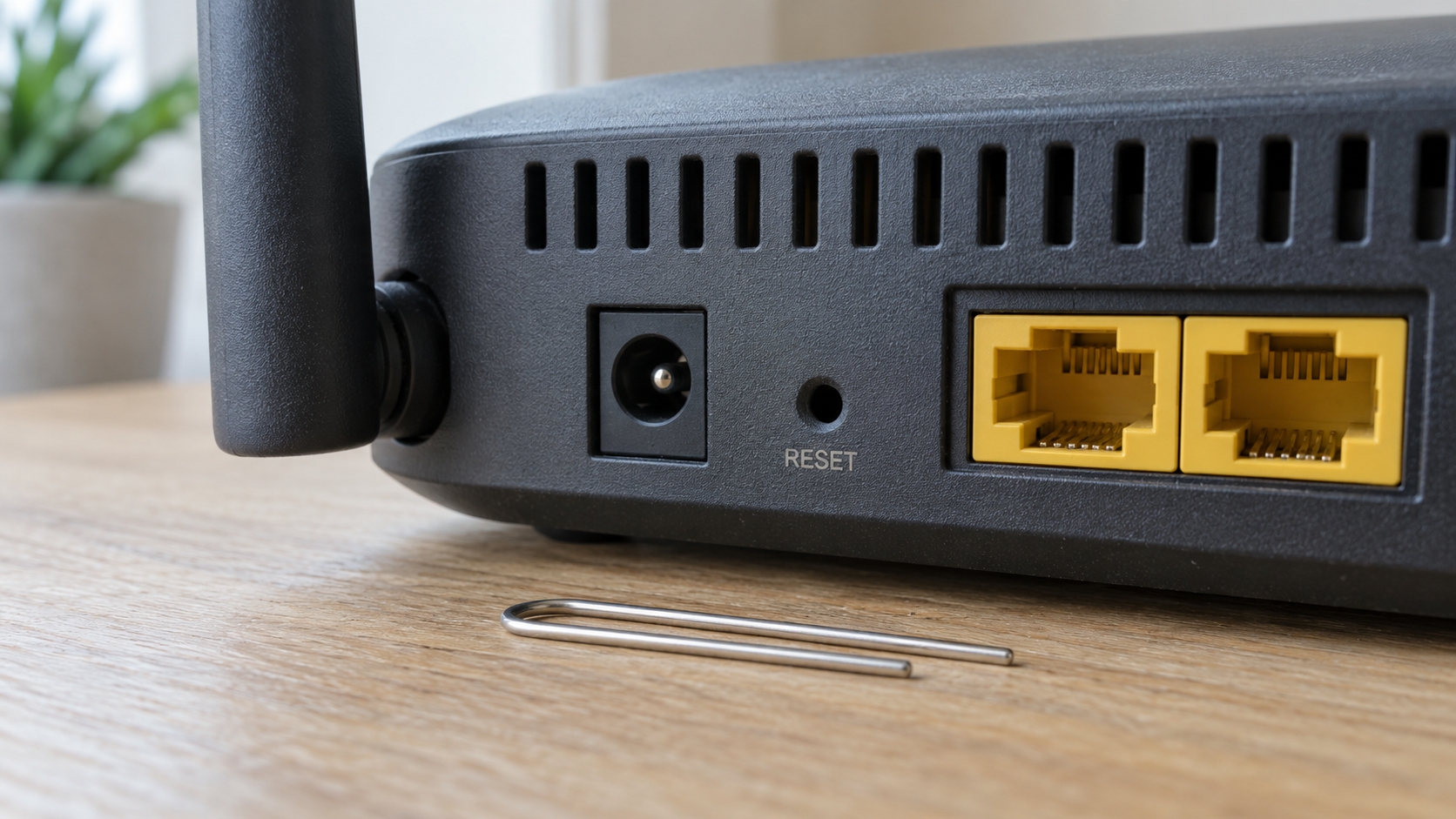
Follow official guidance about firmware recovery and configure necessary settings again if compromise makes the old configuration untrustworthy. Do not immediately restore an unexplained suspect backup. If supported recovery cannot establish a maintainable configuration, or support has ended, replacement may be the practical router security decision.
Conclusion
Router security depends on support, software, access, and configuration. A small price tag does not prove surveillance, and a large one does not establish a secure product. The seven risks above give you concrete questions to answer about the device you actually own.
Keep supported equipment updated, restrict unnecessary access, and replace hardware when a meaningful security problem cannot be fixed. Treat slow speeds as a troubleshooting clue rather than a verdict. When you have credible evidence of compromise, use trusted help and a recovery process that fits your model and service.
Want more practical AI and cybersecurity guidance for everyday digital risks? Subscribe here.
FAQ
Can a compromised router read all my passwords?
Not automatically. Correctly protected HTTPS contents remain encrypted in transit. A compromised router can still interfere with traffic, expose available metadata, or direct some connections toward harmful destinations. Do not ignore certificate warnings or install a new certificate on an unverified page. Router security is one layer alongside device and account protection.
Does a guest network fix an insecure router?
No. It can limit communication between devices when the model and settings enforce that separation, but it still depends on the same router. It does not restore trusted firmware or repair unauthorized administration. Check local-network access and client-isolation controls instead of assuming the network's name proves its boundary.
Must I replace a router just because it is cheap or old?
No. Check support status, available fixes, necessary security features, and reliability. A supported affordable model may meet your needs. An unsupported premium model may not. Router security is not guaranteed by an unopened box or an arbitrary replacement interval.
Is a factory reset proof that the problem is solved?
No. It clears settings according to the product's design, but you still need supported firmware and a trustworthy configuration. Ask the manufacturer or provider for model-specific instructions. Continuing problems do not automatically prove hidden malware; they may require further troubleshooting or replacing equipment that can no longer be maintained.