
You want help understanding a confusing letter, summarizing a meeting, or turning a long medical explanation into plain English. Copying the original into an AI chatbot feels like the quickest route. Before you paste, ask a different question: Does the tool need the real document, or would a general description get you the help you need?
That pause matters because a prompt can contain more than the words you want explained. It may include a password, an account number, a customer's name, a diagnosis, or a detail that identifies a legal matter. The FTC's discussion of AI privacy and confidentiality commitments recognizes that people submit internal documents and user data to AI services and says providers must honor their privacy promises. This does not mean every chatbot publishes or trains on everything you enter. It means the decision should come before the upload, based on the material and the exact service you are using.
This guide helps you sort information by type, rewrite a question so it reveals less, check the relevant product controls, and respond if you have already shared something sensitive.
Key Takeaways
- Keep passwords, one-time codes, recovery codes, API keys, and similar access material out of prompts and attachments.
- A name is not the only way to identify someone. Dates, places, job titles, rare events, and document details can point back to a person when combined.
- Treat work, customer, patient, and client records as material for an approved process or professional channel, even if an AI chatbot seems convenient.
- Check the exact service, account, settings, and connected tools. A setting about model training does not answer every question about storage, review, or sharing.
- If you pasted a secret, act on the secret first: change or revoke it, then follow the appropriate workplace or personal recovery steps. Deleting the chat alone is not a complete response.
First, decide what the chatbot actually needs
A useful prompt does not always require the original material. You can ask, “What questions should I ask about an unfamiliar charge on a bank statement?” without uploading the statement. You can ask for a plain-language explanation of a medical term without entering a patient's history. You can ask for an outline of a customer-service reply without pasting the customer's account record.
Use three questions before each paste or upload:
- Does this text grant access? Look for passwords, temporary codes, recovery links, private keys, API tokens, session details, or instructions that would let someone enter an account or system.
- Could someone identify a person or organization? Look beyond names. A specific job title, date, location, amount, sequence of events, or file header may make a person recognizable.
- Am I allowed to share this material with this service? Permission depends on the source of the information, your role, your organization's policy, and the product account in front of you.
If the answer to any of these is uncertain, start with a made-up example or a general question. You can always add limited context later if you establish that the chatbot service and channel are appropriate. You cannot count on taking back a secret once you have submitted it.
NIST's guide to protecting personally identifiable information explains that information can identify a person directly or become identifying when linked with other available details. For AI chatbot use, that means removing “Maria” from a letter is a start, not proof that the letter is anonymous. A clinic name, appointment date, uncommon condition, and small town may still point to Maria.
Think of inputs in three practical groups. Public facts and invented examples are usually the simplest starting point. Personal context may be usable after careful minimization, if you are comfortable with the chatbot service's practices. Credentials, complete identifiers, confidential records, and information entrusted to you by someone else call for an approved channel. These groups are a decision aid, not a legal classification or a promise that any prompt is risk free.
Why an AI chatbot's settings matter
People often ask a single question, “Is this AI chatbot private?” The answer depends on several separate practices. A chatbot service may process your prompt to produce an answer. It may keep a conversation in account history. It may use eligible content to improve models. It may have safety or quality review processes. A shared link or connected drive may make content available in another place. The rules for those activities can differ within one product.
NIST's Generative AI Profile identifies risks that include disclosure, misuse, and re-identification of sensitive information. The profile describes possible harms to manage; it does not establish that a particular chatbot leaked a reader's prompt. The practical lesson is to match the sensitivity of the input to the actual controls and promises of the service.
Read the chatbot provider's promise that applies to your account rather than assuming that a familiar logo means the same protections across consumer, work, school, and developer products. The FTC's point about honoring commitments makes the wording of that promise useful: a statement about model training answers a different question from a statement about who may access your content.
Product examples show why those distinctions matter. OpenAI's explanation of data handling in consumer services separates model-improvement controls from memory and personalization settings. Temporary Chat has different history, memory, and training rules while it remains temporary; saving it turns it into a regular conversation under the account's settings. It is not a promise of zero processing or retention. Google's Gemini Apps privacy guidance separately discusses activity settings, temporary chats, review, and retention. Microsoft's guidance for work and school Copilot Chat distinguishes not using prompts to train foundation models from logging and organizational controls. Those are product-specific descriptions, and the current terms and account settings should govern your decision when you use a service.
Do not collapse a training switch into a full confidentiality decision. A chatbot service can refrain from using a prompt for model improvement and still process or keep it for other stated purposes. A private account is not automatically a zero-retention channel, and a prompt is not automatically public. Ask the more precise questions: What is stored? Who can access it? What can I share by link? Which connected tools can read or write data? What controls does my organization provide?
Keep passwords, codes, and identity details out
Access secrets are the clearest category. Do not paste a password to ask whether it is strong. Do not enter a one-time sign-in code because a chatbot asks you to confirm a login. Do not upload a configuration file that contains an API key, even if your question concerns a different line. Recovery codes, reset links, private keys, and session tokens deserve the same treatment.
For troubleshooting, replace the secret with a label. A prompt such as “My app returns an authorization error after I rotate [redacted API key]; what configuration steps should I check?” can yield a useful checklist without exposing the key. If the actual value is needed for support, use the provider's approved support process rather than a general chatbot. A password manager or the service's security page is a better place to assess and change a real credential.

Personal identifiers need similar care. Social Security numbers, passport and driver's license numbers, full bank or card details, tax forms, and images of identity documents should not be casual chatbot prompt material. A photo may contain an ID number, signature, birth date, and address together. When you need help understanding a form, ask about the field name or a blank version of the form. When you need help comparing charges, use fictitious amounts and merchants unless the actual transaction record is required by an approved financial channel.
The risk also comes from combinations. A full date of birth plus address and employer may identify someone even if you delete their name. A description of a local incident with a precise date and role may identify a colleague or customer. Remove details that are unnecessary for the answer, and step back if the remaining combination is still distinctive. The Privacy & Identity Protection guide offers a broader way to think about the personal data that collects around everyday accounts and devices.
This advice does not mean you cannot ask an AI chatbot about account security. You can ask how to create a strong passphrase, what a hardware security key does, or how to recognize an unfamiliar login notice. Keep the real password, active code, or account record out of the prompt.
Keep workplace, customer, and client information in approved tools
The boundary at work is not simply “my own information versus someone else's.” A meeting summary may contain unreleased plans. A support ticket may contain a customer's contact details and account history. A contract may include negotiation positions. Source code may contain credentials or proprietary logic. The fact that you can open the file does not necessarily give you permission to upload it to a different service.
Start with your organization's approved AI tools and data rules. Confirm the exact workspace and account, not just the product brand. Check whether the organization has enabled the tool for this kind of material and whether the document owner permits that use. A work-branded AI chatbot can have different controls from a personal account, but that does not automatically authorize every upload. A prohibition or approval process in your organization still applies.
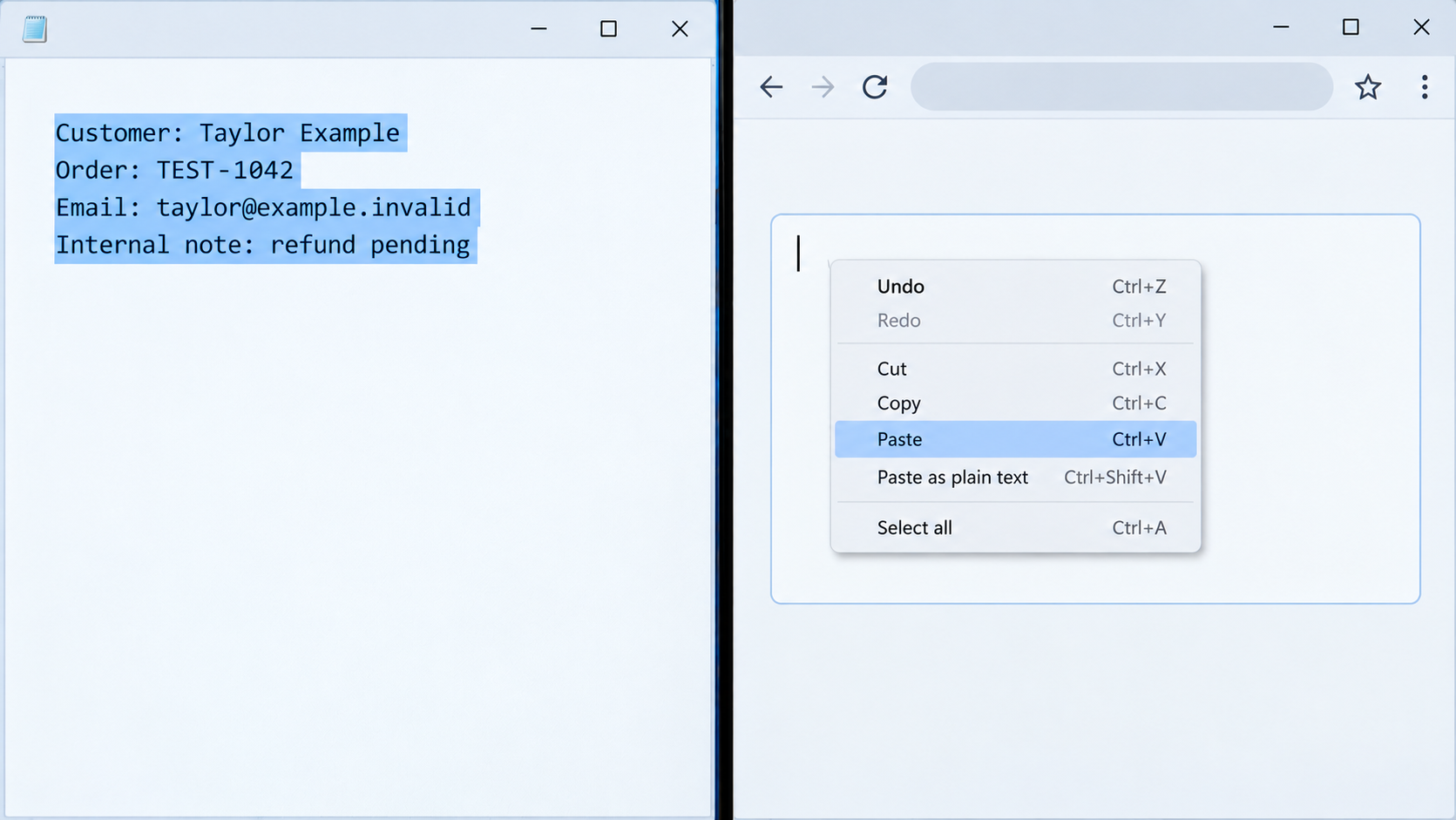
Suppose you want chatbot help replying to a customer who reports a delayed refund. Do not paste the ticket with the customer's name, order number, email, purchase history, and internal notes. Ask for a courteous response outline for a hypothetical delayed refund, then write the real response in the approved customer system. If the exact policy language matters, use an approved excerpt or ask the policy owner which wording may be shared.
Chatbot file uploads deserve the same review as typed prompts. Before uploading a spreadsheet, inspect all sheets and hidden columns. Before uploading a document, look for comments and tracked changes. Before sending a screenshot, check the browser tabs, notifications, account identifiers, and background windows. These are ordinary ways extra context can accompany the text you meant to ask about. A connected drive or mailbox broadens the question further: Which files can the tool access, for how long, and under whose permissions?

When there is a real business need for AI assistance with restricted material, involve the security, privacy, legal, or data owner who governs that workflow. They can identify an approved environment, a permissible data set, or a safer process. A generic chatbot answer is not a substitute for that authorization.
Be careful with health and legal records
A chatbot question about medicine can often be separated from the patient's identity. You can ask, “What does this term usually mean, and what questions should I ask my clinician?” without uploading a lab report, medication list, insurance card, or a child's chart. A general explanation may help you prepare for a conversation. It cannot determine what a result means for your specific care, and urgent medical decisions belong with a qualified professional.
Do not assume that a consumer chatbot becomes a protected clinical portal because the subject is health. HHS guidance on health data in personal apps distinguishes HIPAA-covered organizations and their business associates from many consumer apps. The correct treatment depends on the service and relationship, not merely on whether a prompt contains a diagnosis. A clinic may have an approved patient portal or other route for questions about the actual record. Use that route when the real details are necessary.

The same distinction helps with legal material. Asking what a term such as “indemnity” commonly means differs from uploading an attorney's confidential message, an unfiled complaint, a settlement offer, or a document identifying a client. For a personal matter, ask a general question and bring the actual facts to your lawyer or approved legal service. Do not treat a chatbot's confident answer as advice tailored to your case.
Professionals have further duties. American Bar Association Formal Opinion 512 discusses lawyers' responsibilities when using generative AI, including protecting client information and assessing the tool and circumstances. Whether consent is needed depends on those circumstances. This guide does not claim that a single upload automatically waives privilege or creates a particular legal violation. It gives readers a practical pause: when a document exists within a confidential professional relationship, use the channel that relationship requires.
Health and legal examples can be especially identifying after a superficial edit. A rare condition, precise appointment date, small practice, or unusual case history may identify someone without a name. If a general question cannot be separated from the actual record, ask the appropriate professional directly instead of testing how much of the record a chatbot can absorb.
Remember that attachments can reveal more than the visible paragraph
The information you mean to share with a chatbot may be only a small part of what you submit. A screenshot of an error message can also show a person's email address, an open patient tab, and the organization's dashboard. A PDF may include letterhead, case numbers, signatures, or notes on pages you did not intend the chatbot to summarize. A voice recording can contain another speaker or background conversation. A link can lead to a shared document with wider access than the single sentence in your prompt.
Inspect the whole chatbot input. Open the file as a recipient would, review every page and sheet, and remove or replace unnecessary context. For a screenshot, crop only after confirming that the result still does not contain private material. For a document, start a new text file and copy only the non-sensitive excerpt the question needs. Do not assume that covering a name in a preview removes it from the underlying file. If you cannot establish what a file contains, describe the problem instead of uploading it. For a connected tool, review its permissions and disconnect it when the task is over if you no longer need that access.
The service itself matters too. The Is This AI Tool Safe? checklist can help you evaluate an AI product before handing it a file or granting it access to other accounts. Treat the checklist as the start of a decision, then read the current product and organization terms for the actual data you plan to use.
Safer ways to ask a chatbot for help
You can often preserve the useful part of a question while leaving out the original data. The goal is to give the chatbot no more information than it needs and keep restricted material in the proper channel. Use this short preparation routine before sending:
- Write the question first. State what you want to learn or produce in a fresh, empty message. Keep the original document in its approved location.
- Build the smallest useful example. Add a public term, fictional rows, or a short permitted excerpt. Do not begin by copying the whole record and hoping to remove enough later.
- Read the finished input once. Check names, indirect clues, access secrets, every attachment, and any connected source. Ask whether each detail changes the answer you need.
- Choose the channel before sending. If the answer needs the real case or you cannot share the necessary details, use the approved system or responsible professional.
Do the reduction before the upload. Asking the same general chatbot to redact a sensitive original would require handing it the original first. If you need help planning redaction, ask for a general checklist without submitting the private material.
Ask about a concept instead of a document. If a legal letter contains a term you do not recognize, ask for a general definition and questions to raise with your lawyer. If a lab report uses an unfamiliar phrase, ask what the phrase usually describes and what context a clinician would need. This separates background learning from advice about your particular situation.
Replace real numbers and records with invented examples. To compare budgeting methods, use round fictional amounts rather than a bank statement. To understand a spreadsheet formula, use a few synthetic rows with the same column structure rather than customer records. Mark the example as invented so the answer does not pretend to analyze your actual account or patient.
Paraphrase the task, not the private story. You might ask, “Write a kind, concise acknowledgment of a delayed service request, without promising a refund,” rather than pasting a customer's complaint. You can then adapt the result inside the approved system after checking it against the real policy and facts.
Remove indirect clues as well as names. A prompt can identify someone through a precise date, position, location, rare event, or unique dollar amount. Change or omit those elements when they are unnecessary. Redaction reduces exposure; it does not guarantee anonymity. If the details are central to the answer, the better route may be an approved workspace or a trusted human.
Keep specialized decisions with the right person. A chatbot can help you prepare questions for a doctor, lawyer, financial institution, or security team. It should not receive a complete sensitive record simply because you want a second opinion, and it should not make the final decision where the full context and professional responsibility matter.

For example, a risky prompt might paste a complete refund ticket with an order number, the customer's email, and internal agent notes. A safer prompt says: “A customer says a refund is late. Draft a short acknowledgment that apologizes for the wait, gives no unverified timeline, and asks them to use the official support channel for account-specific help.” The second prompt still produces a useful writing aid while leaving the real customer record where it belongs.
Check the exact chatbot service before using it
When the material is more sensitive than a public question, look beyond the chatbot product's marketing summary. Start with the account you are actually signed into. Is it a personal account, an employer-managed workspace, a school account, or a developer integration? Who administers it? Which policy applies to that plan? An account label that sounds professional is not, by itself, permission to upload a confidential file.
Then check the controls that match your concern. If you do not want a conversation in visible history, find the history or temporary-chat setting. If you do not want eligible content used for model improvement, find the relevant data-use control. Check memory or personalization separately when you do not want details carried into later interactions. If you are worried about other people seeing it, inspect shared links, collaborators, and connected apps. If the concern is retention, read the deletion and safety-retention explanation. A single “privacy” switch rarely answers all those questions.
Finally, check the source of the material. You may be allowed to ask about your own public writing but not upload a customer's case file. You may use an approved workplace tool for a permitted task but not a personal account for the same file. You may have a doctor or lawyer's secure portal for case-specific questions. When the product terms or your authority are unclear, send a general prompt and seek clarification before submitting the record.
These product rules can change. Recheck the current guidance for the service and account when the choice matters, especially before a new file upload or connector permission. That is a narrower and more reliable habit than deciding once that every AI chatbot is either safe or unsafe for all data.
If you already pasted something sensitive
Do not spend the first hour trying to decide whether the chatbot “memorized” your content. Identify what you entered and act on the access or confidentiality risk you can control. Stop sharing the conversation or file, close any public link you created, and note the service, account, approximate time, and material involved. Preserve only what your organization needs for its incident process; do not spread the sensitive text further in screenshots or group messages.

If the input contained a password, API key, recovery code, or active sign-in token, change or revoke it in the service that issued it. Review recent account activity and strengthen sign-in. The FTC's guidance on two-factor authentication explains how an additional sign-in factor helps protect accounts. A one-time code may expire, but you should still review the account if it was exposed during an active sign-in attempt. Deleting the chat is not a substitute for replacing a working secret.
If you entered usable full payment-card details, contact the card issuer promptly through its app or a number you verify independently and ask whether the card should be replaced. If you entered usable bank-account details, contact your bank through its official channel to ask how to secure or replace the account. The FTC's exposed-data guide gives separate steps for card and bank information. A few partial digits do not automatically call for replacement; base your response on what you actually entered.
If you entered a Social Security number or comparable identifier without known misuse, review IdentityTheft.gov's preventive steps for exposed information. Monitor relevant accounts and report unauthorized charges or other signs of misuse promptly. If you suspect identity theft, the FTC's identity theft guidance points to a recovery plan. The Identity Theft Response Checklist can help you organize the next steps. An accidental paste creates a possible exposure; it does not by itself prove a breach or misuse.
If the material belonged to an employer, customer, client, patient, or legal matter, use the designated security, privacy, or legal contact promptly. Tell them the service, account, file or prompt type, time, and whether a link or connector was involved. Let the responsible team assess notifications, contractual duties, and removal steps. Do not assume that every paste is automatically a legally reportable breach, and do not hide it because you are unsure.
After addressing the exposed secret or notifying the responsible team, use the chatbot service's deletion and support controls. OpenAI's chat and file retention guidance illustrates why more than one step may be needed: archiving a chat keeps it, and deleting a chat does not delete a separately saved Library file. Check both the conversation and any separately stored upload. Deleted chats are scheduled for removal subject to the stated exceptions; the service's current policy governs the timing.
Other services have their own rules, so look for the equivalent conversation, file, and sharing controls rather than assuming one Delete button covers everything. Remove any shared link you created and ask the provider or responsible team about material you cannot remove yourself. Deletion cannot rotate a password, retrieve someone else's copy, or guarantee that all copies disappear immediately. If the issue involves a live account compromise, contact the provider or your organization's security team through its official channel now.
Conclusion
Before you paste, ask whether the AI chatbot needs the real person, account, document, or secret to answer. Often it does not. A general question, a fictional example, or a carefully reduced excerpt can give you useful help while leaving sensitive material in the place designed to handle it.
When the original details are necessary, verify the exact service, account, permissions, and organization rules, or use a trusted professional channel. Product controls are valuable, but a prompt field should not become the default storage place for passwords, private records, or someone else's confidential information. For more practical cyber and privacy guidance, subscribe to Quantum Cyber AI.
FAQ
Is deleting a chat enough after I pasted a password?
No. Change the password or revoke the exposed credential in the account where it works, then review recent activity. Use the chatbot's deletion controls as another step, with the limits described by that service. If the same password was reused elsewhere, change it there too. A shared conversation link should be disabled if one exists. Your response should address the working credential first because removing a conversation does not make an exposed password safe again.
Can I paste medical information if I turn off model training?
A training control answers only one part of the privacy question. Check storage, review, history, sharing, and the service's current terms. Consider whether a general medical question or a clinician's portal would meet your need without uploading an identifiable record. Do not assume that HIPAA applies to every consumer app or that a chatbot answer can replace advice from the clinician who knows your case.
Is a paid or work AI chatbot automatically safe for confidential documents?
No account label alone settles the question. An employer-managed workspace may have useful protections and approved uses, but you still need to know which workspace you are in, what data is allowed, who administers it, and whether the document owner has authorized the task. For client or customer material, follow the organization's actual policy. Use a synthetic example while you seek an answer if the approval is unclear.
Is removing someone's name enough to anonymize a prompt?
Usually not. A precise date, uncommon event, small workplace, location, case detail, or group of facts may still identify the person. Remove unnecessary details, not just the obvious label. If the remaining facts are unique and essential, use an approved channel for the actual case instead of presenting the prompt as anonymous.
Can I use an AI chatbot to understand a legal or medical term?
Yes, a general explanation can help you prepare better questions. Ask about the term without pasting the complete confidential letter or health record. A professional can interpret the term in the context of your actual document, care, or case. If the answer would change a medical, financial, or legal decision, take that decision to the qualified person or official channel responsible for it.