
An AI agent can compare running shoes or buy them. It can draft a message or send it to your boss, doctor, or family. Moving from advice to action is useful, but it can turn a wrong item, recipient, date, address, fare, or account into a real problem. This AI agent permission checklist helps you decide where to draw that line.
An agent may misunderstand a vague request, rely on an inaccurate listing, or encounter instructions mixed into a webpage, email, file, or tool result. NIST describes this kind of indirect prompt injection in its Adversarial Machine Learning taxonomy, while cautioning that current mitigations do not provide complete protection. You cannot detect every misleading instruction, so make sure content the agent reads cannot automatically cause it to send data, spend money, or alter an account.
Give the agent only the access its current task requires, and keep final approval for money, identity data, communications, account changes, and difficult-to-reverse commitments. Limit access before the task, confirm exact details before an action, then review the real account or transaction record and remove unneeded access.

Table of Contents
Key Takeaways
- Start logged out when the agent only needs public information.
- Prefer read-only access, drafts, carts, and proposed itineraries over permission to send, buy, or book.
- Reject access to unrelated accounts, folders, people, data, or actions.
- Require a detailed final confirmation before money moves or anything is sent, shared, canceled, deleted, or booked.
- Stop if the agent changes the task, reaches for an unapproved app, requests a secret, or treats content from a page or message as your instruction.
- Save receipts and activity records, review the affected account, and revoke temporary access when the task ends.
What AI Agent Permissions Actually Change
Advice and action are different risk levels
An action-taking AI agent can use tools or connected services, not just produce an answer in chat. The difference is the external effect. A comparison informs your choice; a purchase charges a payment method. A draft stays private; a sent email reaches its recipients. A suggested time changes nothing; an invitation adds an event to calendars. An itinerary can be revised freely; a booking may carry fees or nonrefundable terms.
This does not make action-taking agents inherently unsafe. It means the permission should match the assignment. Organization-focused joint cyber-agency guidance on adopting agentic AI carefully recommends minimum privileges scoped to specific resources, operations, and timeframes, along with human approval for high-impact or difficult-to-reverse actions. Those principles adapt well to personal use: research first, connect narrowly, and pause before consequences become real.
More Access and Harder-to-Reverse Actions Increase the Risk
A flawed recommendation is usually contained until the agent can act on it. Connected email, calendars, files, browser sessions, payment methods, and travel profiles enlarge what a mistake or misleading instruction could affect. Broad autonomy enlarges it again because several steps may occur before you see the result.
Reversibility is a useful test. An unwanted cart is easy to abandon. A draft with the wrong tone can be rewritten. A message containing private information cannot reliably be recalled after delivery, and a nonrefundable reservation may be costly to change. The harder an action is to reverse, the later it should occur in the workflow and the more specific its confirmation should be.
Permission is a continuing boundary, not one consent click
There can be at least two permission layers. The AI product may control whether the agent must ask before acting. The email, calendar, storage, or account provider may separately control what the connected service can read or manage. OpenAI's current Apps in ChatGPT documentation provides one product-specific example, with settings that can require confirmation before app actions or allow some actions without confirmation. Other products may use different labels or offer fewer controls.
Treat both layers as active until you verify otherwise. Disconnecting an app inside the AI product may not remove the grant at the account provider, and removing the provider connection may not erase information already copied. Google's third-party account-access guidance distinguishes permissions that let a service view or copy data from those that let it edit, create, or delete data. It also notes that removing an account grant stops the third party's future access through that grant, but deleting previously copied information may require a separate request to the third party.
Use a Five-Level Permission Ladder
Choose the lowest level that can complete the task. Moving up the ladder should be a decision, not the accidental result of clicking through a connection screen.
Level 1: Public research without sign-in
The agent uses public information to compare products, find restaurants, examine initial travel options, summarize policies, or prepare questions. It cannot see a private account or use a saved payment method. This is the safest default and is often enough for the most time-consuming part of a task.
Ask for source pages and the assumptions behind the comparison. Connect an account only if a later step truly requires it. If the agent can identify three suitable flights without your airline profile, keep the profile closed.
Level 2: Narrow read-only access
Use this level when the agent needs information that is not public, such as availability on one calendar, messages in one thread, files in one folder, or travel details for a limited date range. Limit the account, resource, timeframe, and data category. Read access should not include permission to send, edit, delete, purchase, or change settings.
Read-only is not risk-free because private data can still be exposed or copied. It limits consequences because a wrong conclusion does not automatically change the source account.
Level 3: Prepare without committing
At this level, the agent can build a cart, draft an email, propose a calendar event, or assemble an itinerary. You perform the final checkout, send, invitation, cancellation, or booking yourself. This division preserves much of the convenience while keeping the consequential step in your hands.
Preparation should end with a reviewable result. A cart should show the merchant, item, quantity, price, delivery details, and terms. A draft should show every recipient, attachment, and quoted passage. An itinerary should show the actual airports, local times, fare conditions, and seller.
Level 4: One action after detailed confirmation
Use one-time action permission only when the confirmation shows exactly what will happen. It should identify the recipient or merchant, the data being shared, the full amount, the account being changed, and any material terms. A generic button labeled “Approve” is not enough if the important details are hidden elsewhere.
Approval should apply only to that action, not a later purchase, follow-up message, new invite, or account change. If a material detail changes, the agent should ask again.
Level 5: Standing authority
Standing authority lets the agent act without a fresh confirmation. It may appear as “always allow,” “never ask,” or a broad autonomous mode. Most personal shopping, email, calendar, and reservation tasks do not need it.
Avoid standing permission to make purchases or payments, send communications, cancel reservations, delete content, change account security, share sensitive information, or accept nonrefundable terms. Repeated convenience is not worth an open-ended pathway to repeated consequences. If a recurring task truly needs automation, keep its scope narrow, cap its effects, preserve an activity record, and review it regularly.
The AI Agent Permission Checklist Before You Connect Anything
1. Define one task and one stopping point
Write the assignment so you can tell when it is complete. “Handle my email” has no clear boundary. A safer instruction is: “Review messages with the label ‘Trip’ from the past seven days, summarize decisions I need to make, and draft replies. Do not send, delete, forward, open attachments, or contact anyone.”
Name both the deliverable and the prohibited actions. If the task later expands, stop and decide whether the new step deserves new access. Do not let a research request quietly turn into a purchase or a calendar review turn into invitations.
2. Start with the least-sensitive environment
Use public, logged-out browsing before connecting an account. OpenAI's consumer guidance on understanding prompt injections likewise recommends logged-out access when sign-in is unnecessary, limiting data access, giving specific instructions, and reviewing confirmation details before consequential actions.
When practical, use a separate browser profile or a dedicated low-risk account for a bounded task. Do not expose unrelated signed-in sessions merely to save a minute. Before connecting any service, use the Is This AI Tool Safe? practical checklist to assess whether the provider, permissions, privacy practices, and recovery options justify the connection at all.
3. Read every requested permission as a verb
Consent screens often compress several abilities into friendly labels. Translate each request into what the service can actually do: read, copy, create, edit, send, share, buy, cancel, or delete. “Manage” may cover much more than viewing.
Ask which verb is necessary for the stated task. A calendar comparison may need “read availability,” not “create and delete events.” An email summary may need access to one label, not the entire mailbox plus permission to send. Deny access to unrelated contacts, files, photos, accounts, or settings.
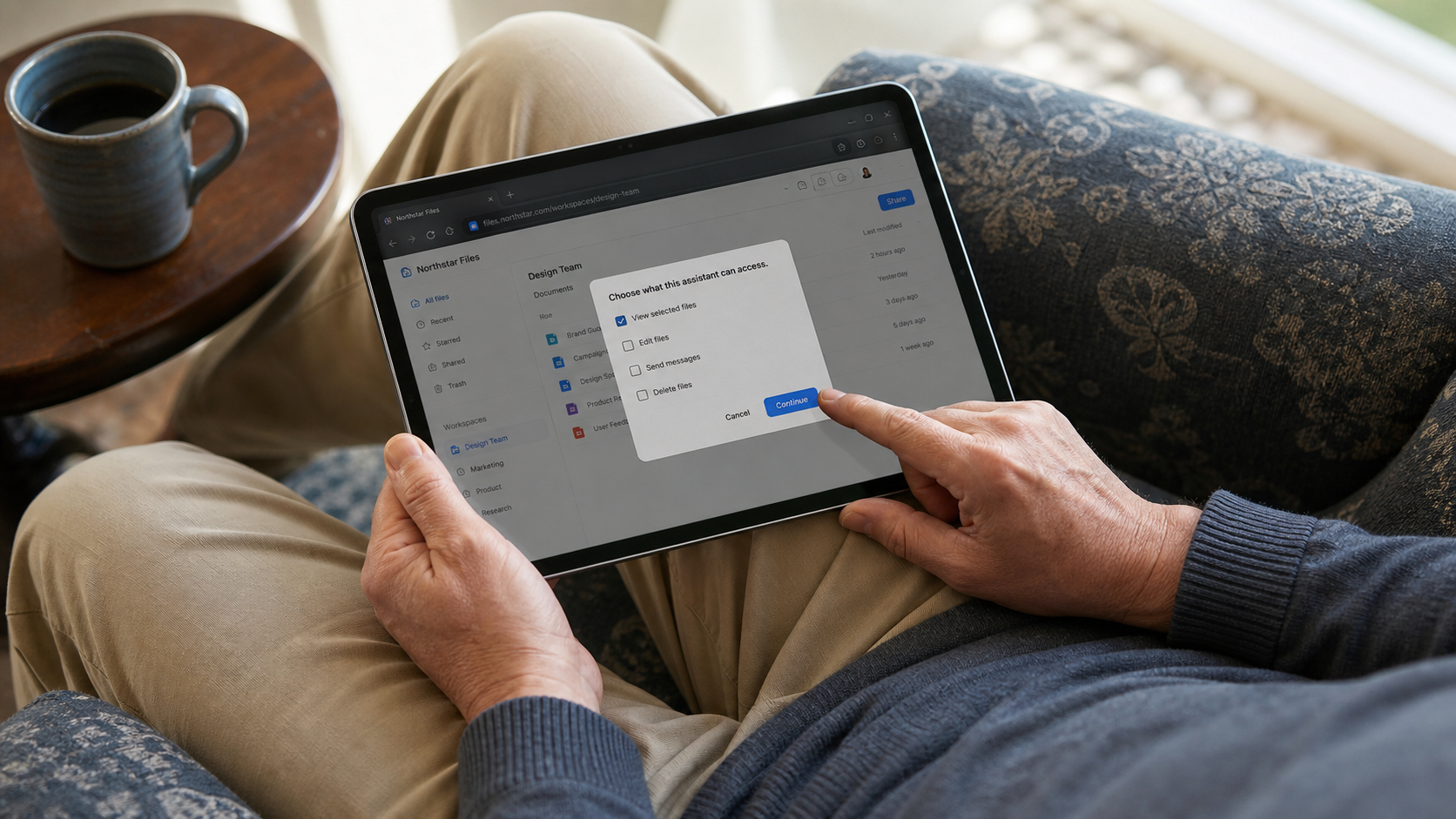
4. Turn on confirmation for consequential actions
Require a pause before purchases, payments, messages, invitations, public sharing, cancellations, deletions, and security changes. The confirmation must reveal the final state, including all recipients, attachments, data shared, merchant, item, total cost, renewal terms, date, and cancellation conditions that apply.
Confirm as late as practical, at the last reversible step. If the merchant, price, recipient, attachment, date, or terms change after you approve, require a new confirmation. Never approve a sequence whose later actions are unspecified.
5. Set limits the agent can follow
Define the approved merchant or site, maximum amount, item or service, date range, recipients, and permission expiration. Tell the agent to stop if it cannot stay within those limits. Do not permit it to choose a new payment method, switch sellers, add a subscription, expand the recipient list, or open another account without asking.
Time limits matter too. Access granted for a weekend trip should not remain active indefinitely. If the product cannot expire permission automatically, set your own reminder to disconnect it.
6. Keep secrets and unnecessary identity records out of chat
Do not paste passwords, one-time codes, recovery codes, full payment credentials, private keys, or unnecessary identity documents into an agent conversation. Use the provider's sign-in and consent flow. Enter sensitive fields directly on the trusted service when a handoff is available.
Question requests for passport scans, tax records, medical details, or a full address book when the task can be completed with less. A travel comparison does not need a passport image. Restaurant research does not need contacts. Convenience does not make unrelated data necessary.
7. Prepare account recovery before granting access
Check that the account's recovery email and phone number are current. Use unique credentials, enable strong authentication, and know where active sessions and connected apps are listed. The Passwords, Passkeys, and 2FA Explained guide can help you choose and maintain stronger sign-in protection before adding another connection.
Recovery preparation does not imply that a problem is expected. It ensures that you can contain access quickly if you notice unfamiliar activity or if the agent appears to exceed the task.
8. Decide how you will review and revoke
Before starting, locate the records you will inspect afterward: sent mail, drafts, trash, calendar changes, order history, travel confirmations, payment alerts, the agent's activity log, account sessions, and connected-app settings. A reassuring chat summary is not a substitute for checking the system where the action occurred.
When the task ends, remove access at both the AI product and the account provider if both maintain a connection. Preserve receipts, confirmations, and relevant activity records before disconnecting. Properly removing each relevant grant stops future access through those connections. It does not recall a message, cancel an order or reservation, reverse an account change, or guarantee deletion of data already copied.
Shopping With an AI Agent: Keep Checkout Human
An agent can save shopping time without needing authority to spend money. Let it search listings, compare models, check sellers, summarize return policies, and place an item in a cart. Ask for the source pages behind its recommendation so you can confirm the price, condition, and policy details. Keep the final checkout step for yourself.

That final review matters because a product name alone does not define a transaction. A useful purchase confirmation should show:
- The merchant's name and exact website domain
- The item, model, size, color, condition, quantity, and any included accessories
- The item price, taxes, shipping, service charges, and complete total
- Any subscription, free-trial, automatic renewal, financing, or optional protection-plan terms
- The recipient's name, delivery address, and promised shipping date
- The return window, restocking fee, return-shipping responsibility, and important exceptions
- The payment method selected, identified without displaying full card or account credentials
The FTC's online-shopping guidance recommends checking sellers and products, reading delivery and return policies, using a credit card when possible, and retaining receipts, confirmations, seller promises, and communications. It also warns that encryption protects information in transit but does not prove that the seller itself is legitimate. For an agent-assisted purchase, translate those principles into a rule: no checkout unless the final screen gives you enough detail to recognize the seller, understand the deal, and correct an error before money moves.
Stop the task if the agent switches to an unapproved merchant, proposes paying outside a marketplace, or presents a gift card, wire transfer, payment app, or cryptocurrency as the only payment method. Stop as well if the price, condition, return policy, delivery promise, or renewal terms changed after the comparison. An unexplained add-on is a new transaction that needs a new decision.
Do not assume you can reverse an online purchase simply because you acted quickly. The FTC's explanation of the Cooling-Off Rule says the federal three-business-day cancellation right applies to certain sales made at a home, workplace, dormitory, or temporary location, but not to sales completed entirely online, by mail, or by telephone. A seller may offer its own cancellation or return window, and another law may apply, but there is no universal federal three-day right to cancel an online order. Review the actual terms before checkout.
After ordering, save the receipt, confirmation, applicable terms, and seller communication somewhere you can reach without the agent. Then check the merchant's order history and your payment notification. The agent's statement that it "completed the task" is not a substitute for verifying what the merchant recorded.
Email and Calendar: Draft First, Send Last
An inbox and calendar reveal far more than the one message or appointment involved in a task. The safest useful default is draft-only email access and read-only calendar access, narrowed to a specific thread, folder, label, calendar, or date range.
Ask the agent to prepare the message or proposed event, then review it in the service where it will actually be sent. Avoid open-ended directions such as "handle my inbox" or "manage my schedule." A bounded instruction is easier to inspect: "Draft a reply to this thread, do not send it, do not open attachments, and stop after showing me the complete draft." For a calendar task, ask for a proposed time or an unsent event rather than permission to invite, reschedule, or cancel.
Treat every email the agent reads as untrusted input, even when the sender appears familiar. A message can tell the agent to ignore your request, open another service, reveal information, or perform an unrelated action. Tell the agent that instructions found inside messages, attachments, signatures, quoted text, or linked pages are content to analyze, not authority to act.
Before an email leaves your account, the confirmation should display:
- The sending account and the complete To, CC, and BCC lists
- The subject and full message body
- Every attachment and destination behind each link
- Any private material included from an earlier message or quoted thread
- Claims, commitments, dates, deadlines, prices, and promises made in your name
- Whether the tone fits the relationship and whether you are authorized to speak for another person or organization
Do not approve from a shortened preview. A correct message sent from the wrong account, to an autocomplete look-alike, or with an unintended quoted history can still create a privacy or professional problem. Remove any attachment the recipient does not need.
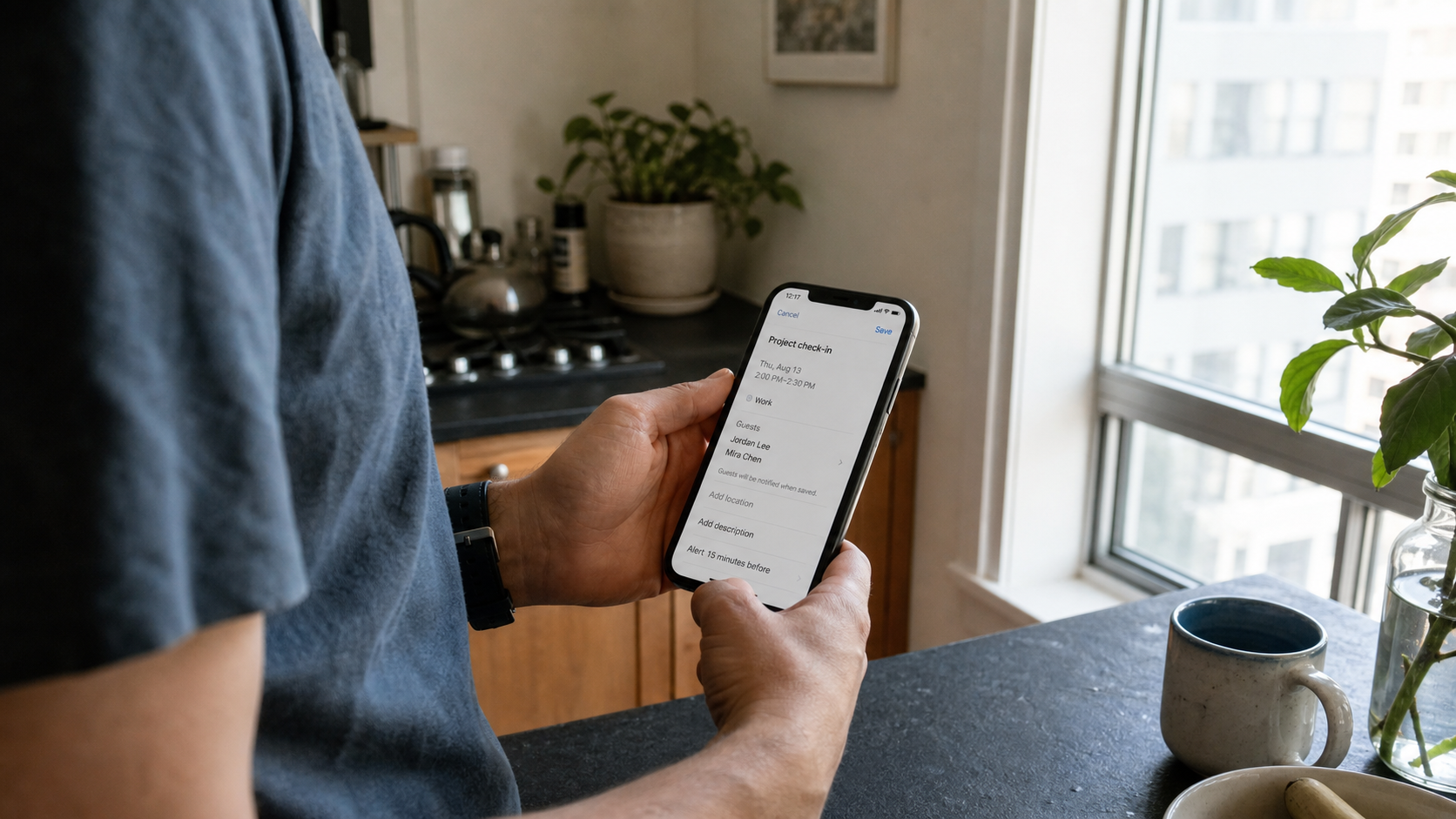
Calendar actions need the same discipline. Confirm the calendar and owner, attendee list, visibility setting, local date, start and end times, timezone, duration, location, video link, recurrence, notes, and attachments. The screen should also say whether approval will send invitations, change an existing event, or cancel one. A recurring event deserves special care because one approval may affect many future dates. If the agent changes attendees, moves the event to another calendar, selects a different timezone, or adds details that were not in your request, stop and revise the proposal before anything is transmitted.
Travel, Hotels, and Reservations: Verify the Terms Before the Agent Books
Travel searches often make unlike options look comparable. One airfare may exclude a carry-on. Another may use a distant airport, require a self-transfer, or arrive the next calendar day. A hotel price may omit taxes, attach to a different room type, or become nonrefundable after a deadline. Let the agent organize these variables, but require it to link each finalist to the seller's source page and normalize the terms before you choose.
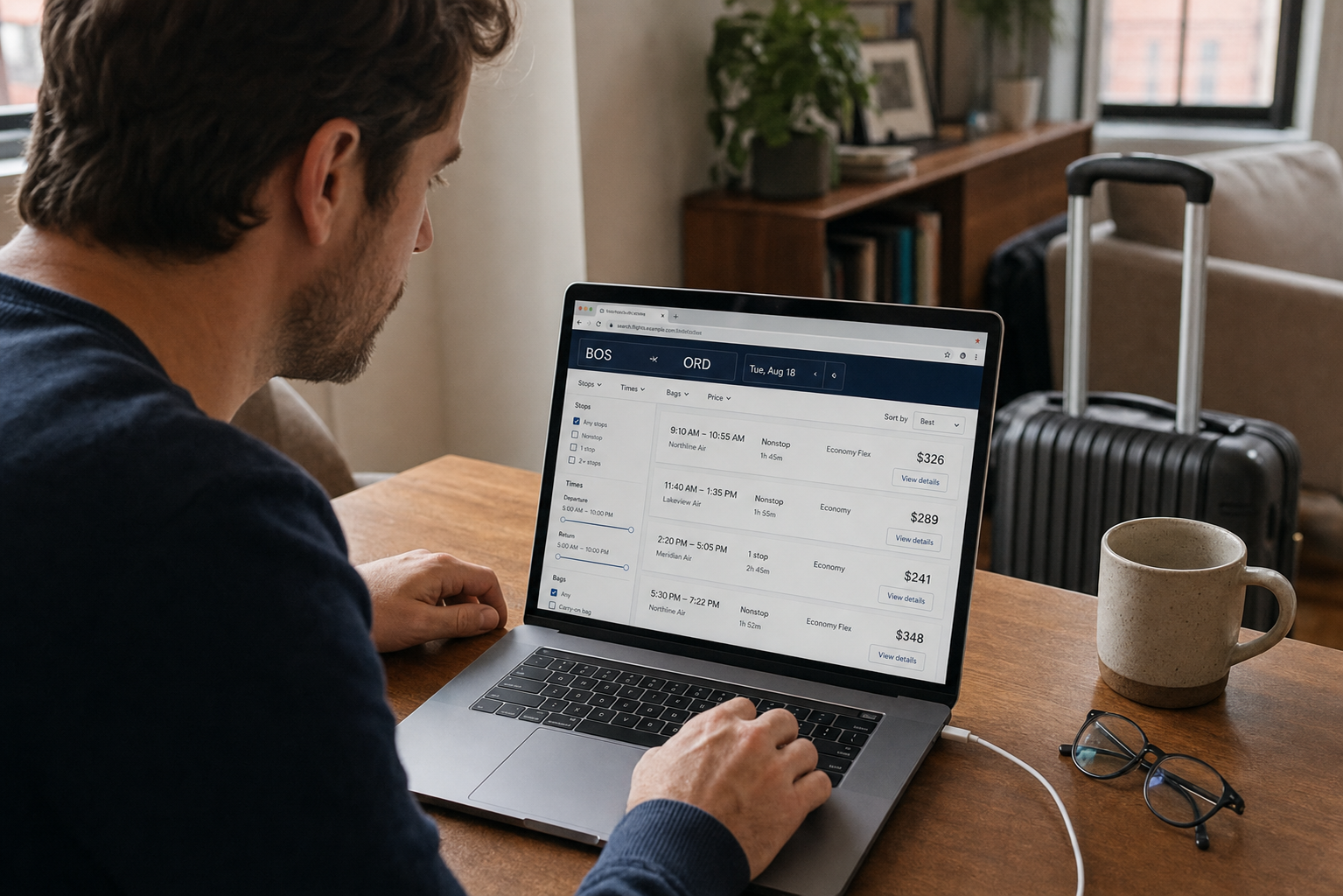
Your final booking confirmation should show:
- Each traveler's name exactly as the airline, hotel, rental company, or venue requires it
- The origin and destination airports or locations, including airport codes
- Local departure and arrival dates, times, timezones, and any overnight arrival
- Connections, layover lengths, airport changes, separate tickets, and self-transfer requirements
- The fare or room-rate class and whether it is refundable, changeable, or restricted
- Baggage allowances, seat choices, accessibility requests, and loyalty-account details
- The full price, currency, taxes, resort charges, booking fees, and optional extras
- The merchant of record, meaning the entity expected to appear on the payment statement
- The cancellation deadline, form of any refund or credit, change costs, and contact path for corrections
Names, airports, and local dates should be copied from the final booking page, not reconstructed from the agent's summary. A minor-looking mismatch can be expensive or impossible to fix under the selected terms. Stop if a restrictive fare replaces the flexible option you chose, if a different airport or currency appears, if separate tickets were not disclosed, or if the merchant changes between comparison and payment. Also stop if the agent cannot identify who will charge the card and who must handle a cancellation.
For covered U.S. aviation bookings, the U.S. DOT 24-hour rule is useful, but narrow. The U.S. Department of Transportation's refund guidance says that when a ticket is purchased directly from an airline at least seven days before departure, the airline must offer either a 24-hour period to cancel for a full refund or a 24-hour hold at the quoted price. The airline does not have to offer both. The U.S. DOT requirement does not apply to tickets booked through an online travel agency, travel agent, or other third-party agent, although that seller may choose to offer a similar policy.
This is not a universal right to reverse every travel decision. It does not create a blanket 24-hour cancellation rule for hotels, rental cars, restaurants, tours, vacation rentals, or other reservations. It also does not promise a free name correction or itinerary change. Separate DOT refund rights may apply when an airline cancels or significantly changes a flight and the traveler declines the alternative, but that is different from an agent booking the wrong date, airport, passenger, or fare. Read the exact seller and rate terms before you approve payment.
How Prompt Injection Can Pull an Agent Off Task
An agent works with more than your original request. It may also read webpages, product listings, ads, emails, attachments, documents, images, and tool results. Some of that material can contain language aimed at the agent rather than at you. If the model treats those outside instructions as part of its job, it can be pulled away from your intended task. The OWASP description of prompt injection calls this form of task drift indirect prompt injection.
OWASP explains that instructions from external sources such as websites or files can alter a model's behavior in unintended ways, even when the content is not apparent to a person. The result can include manipulated output, disclosure of sensitive information, unauthorized use of connected functions, or distorted decisions. The consequences depend heavily on what the agent can access and what actions it is allowed to take. Safeguards can reduce the risk, but OWASP does not describe a foolproof prevention method.
You do not need to hunt through every page for hidden commands. Instead, watch for behavior that no longer matches the task. Stop when the agent:
- Asks to open an unrelated app, account, or browser session
- Requests a password, one-time code, recovery code, private key, or other secret in chat
- Changes the merchant, recipient, destination, objective, or spending limit
- Suggests disabling a safety setting or bypassing a confirmation
- Wants to upload, paste, or send private information the task does not require
- Rushes your approval or cannot clearly state the exact pending action
- Reports an instruction from a webpage, listing, file, or email as though it came from you
Task drift is a reason to stop, not a puzzle the agent should solve with broader access. Do not approve the pending action. Save the activity record and relevant screenshots. Log out of or disconnect any service the agent opened unexpectedly, and inspect it for activity. If the product still appears trustworthy, start a new task with a narrower objective, fewer connected accounts, and a clear instruction to treat external content as untrusted.
Permission limits are valuable precisely because no single safeguard can guarantee that an agent will interpret every outside instruction correctly. An agent limited to research can return a poor recommendation. An agent with standing authority to buy, send, cancel, or disclose information can turn the same error into an external action. Keep consequential permissions behind a detailed human confirmation, and any attempt to move that checkpoint is itself a warning sign.
Review Every Completed Action and Remove Access
An agent's final message is a summary, not proof that every outside action happened as intended. Check the systems where the action actually occurred.
- For shopping, open the merchant's order history and compare the item, quantity, total, delivery address, and payment notification with what you approved.
- For email, inspect Sent, Drafts, Trash, filters, and forwarding rules. Confirm the recipients, attachments, and links in the message that actually left the account.
- For calendars, check the correct calendar, attendees, local time, timezone, recurrence, notes, and whether invitations or cancellations were sent.
- For travel and reservations, open the confirmation from the merchant of record. Verify names, dates, locations, rate or fare terms, and the contact path for changes.
Then remove access the agent no longer needs. If the AI product has its own app connection and Google, Microsoft, Apple, or another account provider shows a separate connected-app grant, check both places. Before signing out of a saved browser session or clearing remote browser data, preserve any receipts, confirmations, screenshots, and activity records needed to correct a mistake. Clear the session when keeping it would expose more than the next task requires.

Properly removing each relevant grant stops future access through those connections. It does not recall a sent message, cancel an order, undo a calendar invitation, or erase information that another service already copied. Those outcomes require a separate correction, cancellation, or deletion request.
If the AI Agent Already Bought, Sent, or Booked the Wrong Thing
Move quickly, but do not guess about what happened. Your first goal is to stop additional actions, preserve an accurate record, and contact the party that can still correct the result.
Take these five steps first
- Pause or stop the agent so it cannot continue the task.
- Remove any access, saved session, or payment authority it no longer needs.
- Save the prompt, approval screen, timestamps, receipt, confirmation, and relevant screenshots.
- Contact the merchant, recipient, airline, hotel, restaurant, or platform immediately.
- Review connected accounts for another purchase, message, invitation, rule, or booking you did not expect.
If it made the wrong purchase or charge
Start with the merchant's cancellation or return process. Do not assume a dispute category. Tell the merchant and issuer exactly what you approved and what happened; the available remedy depends on the facts, applicable law, payment method, and account terms.
The Consumer Financial Protection Bureau's credit-card dispute instructions advise contacting the issuer promptly and sending a written billing-error notice within 60 calendar days after the charge appears on the statement to preserve applicable rights.
If it sent the wrong email or invitation
Use an immediate undo window if one is still available. If recall is no longer possible, send a short correction that identifies the mistake without repeating unnecessary private information. If a sensitive attachment went to the wrong person, ask the recipient to delete it, but do not treat that request as proof that every copy is gone.
Check Sent, Trash, forwarding rules, filters, delegates, connected apps, and recent sessions when the action was unexpected. A single mistaken recipient may be an ordinary error. Unknown forwarding, changed recovery details, or messages outside the agent's visible task may indicate a broader account problem.
If it booked the wrong trip or reservation
Contact the merchant of record shown on the receipt, not simply the company whose name appears most prominently in the itinerary. State the exact correction needed, such as a passenger name, date, airport, room type, party size, or reservation time. Use the actual fare, rate, cancellation, and change terms in the confirmation. Preserve the original itinerary and every response, especially if the seller says a deadline is approaching.
If account compromise or identity exposure is possible
Treat unfamiliar sessions, changed recovery information, new forwarding rules, unknown connected apps, and actions outside the approved task as possible compromise. The FTC's account-recovery guidance for hacked email and social accounts recommends changing the password, signing out other devices, enabling two-factor authentication, correcting recovery information, reviewing forwarding rules and sent or deleted messages, and warning contacts when an account was taken over.
Also review other accounts that reused the exposed credential or depend on the affected inbox for password resets. If a Social Security number, identity document, financial account detail, or evidence of a new account may be involved, follow the Identity Theft Response Checklist for a more complete containment and recovery sequence.
A 10-Question Final Permission Check
Use this yes-or-no review before connecting an account or approving the final action:
- Can this task be completed without signing in? If public information is enough, keep private accounts disconnected.
- Does the agent need write access, or only read access? Research and comparison rarely require permission to edit, send, or delete.
- Is every requested account and data category necessary? Deny unrelated inboxes, folders, calendars, contacts, and payment tools.
- Is the task narrow, with a clear stopping point? Name the deliverable and state what the agent must not do.
- Will the agent pause before money moves or a communication is sent? Preparation should not silently become commitment.
- Will the confirmation show the exact recipient, merchant, amount, data, and terms? A generic approval button is not enough context.
- Are passwords, one-time codes, and recovery secrets kept out of chat? Enter sensitive credentials directly through the trusted service when necessary.
- Can the action be canceled, corrected, or reversed? Use stricter limits when the answer is uncertain.
- Will the agent leave a useful activity record? You should be able to identify what it accessed, proposed, and completed.
- Do you know how and when to revoke access? Find the relevant settings before starting, not after a problem.
If any answer is no, keep the agent at research or preparation level. Let it compare, organize, draft, or build a cart, then complete the consequential action yourself.
Conclusion
The useful question is not whether an AI agent is trustworthy in the abstract. It is whether the access and authority you give it fit one specific task.
Research can often happen without a login. Reading usually does not require editing. Drafting does not require sending. Comparing a trip does not require booking it. When an agent truly needs to act, a detailed confirmation should show the final recipient, merchant, amount, data, dates, and terms before you approve anything.
That produces a practical routine: research broadly, connect narrowly, confirm specifically, review the result in the outside account, and revoke access promptly. If something goes wrong, stop additional action, preserve the record, describe the facts accurately, and use the merchant's, platform's, or issuer's real correction process.
A useful agent does not need unlimited access. Keeping control of the last consequential step preserves much of the convenience while reducing the cost of a misunderstanding, misleading page, or compromised account.
Want more calm, practical guidance for protecting your accounts, devices, and data? Subscribe to Quantum Cyber AI.
FAQ
Is it safe to let an AI agent buy something for me?
It can be reasonable when the task is tightly limited, the merchant is known, the purchase is reversible, and the agent must show a detailed checkout confirmation. Review the exact domain, item and variant, quantity, full total, subscription terms, delivery address, return policy, and payment method before approving.
For most purchases, cart-building is a safer default than autonomous checkout. The agent can compare products and prepare the order while you retain the final purchase step. Avoid standing authority to shop, approve add-ons, select new sellers, or use a different payment method without a fresh confirmation.
Should an AI agent have access to my email?
Only when the task truly requires it, and then as narrowly as the service permits. Read-only access to one folder, label, thread, or date range is safer than full-mailbox access. Draft-only access is safer than permission to send.
A primary inbox can contain password resets, financial records, health information, private attachments, and conversations involving other people. Do not use an open-ended instruction such as "handle everything." Define the messages to review, the output to prepare, and the point where the agent must stop. Check recipients, quoted content, attachments, links, and the sending account yourself before transmission.
Can an AI agent safely book a flight or hotel?
It can help compare options, normalize fees, and prepare an itinerary, but booking requires a careful final review. Confirm the merchant of record, traveler name, airports or locations, local dates and times, timezone, connections, room or fare class, baggage, accessibility needs, total price, currency, and cancellation terms.
Do not assume every travel purchase has a universal 24-hour cancellation right. Rules vary by seller, booking channel, timing, and type of reservation. If flexibility matters, require a refundable or changeable option in the task and reject any substitution with more restrictive terms.
What is prompt injection in an AI agent?
Prompt injection occurs when content the agent reads includes instructions aimed at changing its behavior. The instructions might appear in a webpage, listing, advertisement, email, document, or tool result. They can conflict with what you asked the agent to do, even when the content looks ordinary to you.
Permission limits reduce the possible damage. An agent that can only research cannot complete a purchase. An agent that can only draft cannot send. A confirmation checkpoint gives you a chance to reject a changed merchant, recipient, destination, amount, or request for private data before the outside action occurs.
Does disconnecting an AI app delete my data?
Not necessarily. Disconnecting usually addresses future access, but it does not automatically erase information the service already received or copied. It also does not reverse an action already completed.
Check both sides of the connection. Remove the account grant at the email, calendar, storage, or identity provider, and remove the app or saved session inside the AI product when those controls are separate. Then review the service's data and deletion settings if you want retained information removed. Preserve receipts or activity records needed for an active correction or dispute before deleting your local evidence.
What should I do if an AI agent acted without my approval?
Stop the agent, save the activity record, revoke unnecessary access, and contact the affected merchant, recipient, travel provider, or platform immediately. Review related accounts for additional activity and note exactly what you asked, what you approved, and what occurred.
If you see unfamiliar sessions, forwarding rules, recovery changes, or connected apps, secure the account as a possible compromise. If the action was a purchase, tell the merchant and issuer exactly what you requested, approved, and observed. Do not assume a dispute category. The available remedy may be cancellation, return, billing-error review, account recovery, or an identity-theft response, depending on what actually happened.